
Chestshops
Chestshops allow players to create their own shops for items. Chestshops use the stock of a chest, barrel or other container to trade items for money.
Chestshop owners can restock their shops by simply putting more of the item that is sold by that chestshop into the container that the chestshop is on.
Only one item type can be sold by a single chest shop.
You can distinguish a chestshop by the sign on front of it.
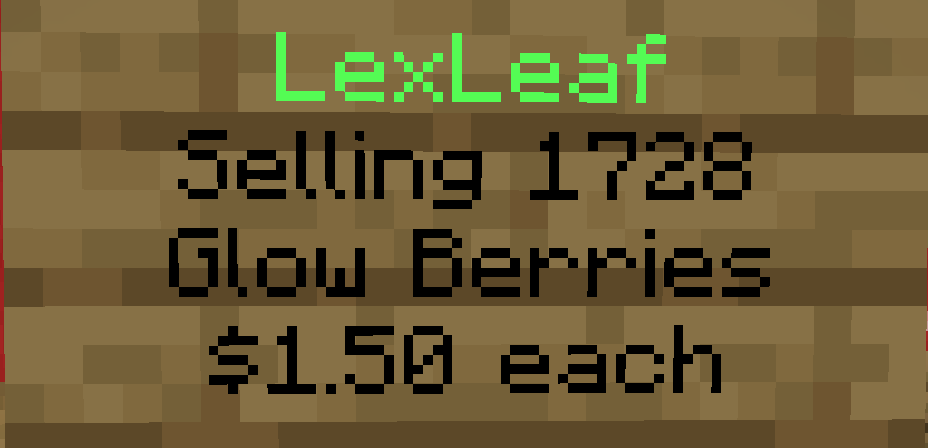
The chestshop owner is the first line on the chestshop sign.
The second line of the sign shows the stock of the item being sold.
The third line shows what the item is that is being sold.
The price of a single item in the chestshop is mentioned on the last row of the sign.
Purchase from a chestshop
To purchase from a chest shop, you can simply left click the sign on the shop and in chat enter the amount of items you want to purchase.
Create a shop
To create a chestshop, simply stand in front of the chest, barrel or other supported container and hold the item you are wanting to sell in your hand.
While looking at the chestshop container, run the command /cshop create (price per unit)
To fill the stock of your chestshop, simply open it and then put the items in.
If you want to let multiple people be able to restock your chest shop, then you can add them as a chestshop staff member. To do this, look at the chestshop in question and run the command /cshop staff add (ign)
Note that only the creator of the chest shop will be able to receive any money collected by the chest shop. Staff members of that shop do not get any money on any purchase.
Tips
If you have a large stock of items that you want in your chestshop but it is already full, you can use a hopper leading into the back, top or sides of the shop.
If you want to find a chestshop of a specific item nearby, you can use /cshop find (item). If that returns nothing, then you can use /cshop browse and that will open up a GUI showing the details such as price, location, owner and item type for every chest shop on the server.